Showing posts with label linux. Show all posts

Monday, May 2, 2016

Yum

특정 저장소 파일만 출력


$ yum --disablerepo="*" --enablerepo="vozlt-base" list available

Loaded plugins: fastestmirror
Loading mirror speeds from cached hostfile
Available Packages
debugmode.x86_64                     1:9.03.31-2.el6.vozlt                   vozlt-base
mysql-bench.x86_64                   1:5.6.15-1.el6.vozlt                    vozlt-base
mysql-embedded.x86_64                1:5.6.15-1.el6.vozlt                    vozlt-base
mysql-embedded-devel.x86_64          1:5.6.15-1.el6.vozlt                    vozlt-base
mysql-test.x86_64                    1:5.6.15-1.el6.vozlt                    vozlt-base


Vim

커서 이동


e 
    Move to the end of a word.

w 
    Move forward to the beginning of a word.

3w 
    Move forward three words.

W 
    Move forward a WORD (any non-whitespace characters).

b 
    Move backward to the beginning of a word.

3b 
    Move backward three words.

$ 
    Move to the end of the line.

0 
    Move to the beginning of the line.

^ 
    Move to the first non-blank character of the line.

) 
    Jump forward one sentence.

( 
    Jump backward one sentence.

} 
    Jump forward one paragraph.

{ 
    Jump backward one paragraph.

H 
    Jump to the top of the screen.

M 
    Jump to the middle of the screen.

L 
    Jump to the bottom of the screen.

10<PageUp> or 10<CTRL-B>
    Move 10 pages up.

5<PageDown> or 5<CTRL-F>
    Move 5 pages down.

G 
    Jump to end of file.

1G 
    Jump to beginning of file (same as gg).

50G 
    Jump to line 50.

'm 
    Jump to the beginning of the line of mark m.

`m 
    Jump to the cursor position of mark m.

''
    Return to the line where the cursor was before the latest jump.
    (Two single quotes.)

``
    Return to the cursor position before the latest jump (undo the jump).
    (Two back ticks. This is above the Tab key on some keyboards.)

 % 
    Jump to corresponding item, e.g. from an open brace to its matching closing brace.

기타


# 패턴 치환
# \1 : 첫번째 패턴일치 변수
%s/^\([0-9]\)/#\1/g
%s/\(.*\)/\1/g


# 옆창
vi -c "20vs ./"
shift + o  # 선택파일 열기


# 파일전체 경로라면 맨앞 글자에서
Ctrl + w + f


# SYNTAX 색깔 없애기
set syntax=off


# syntax 색깔 바꾸기
set filetype=php


# Ctrl + v
수직 선택 모드


# v 모드에서
> 탭삽입


# 함수 원형 알아내기
[i


# 변수 선언부로 이동
gd


# 소스를 정렬 (전체 선택은 v -> G)
v로 블록 지정후 = 누르기


# 마킹
m[임의의 알파벳]


# 마킹 이동
'[마킹한 알파벳]
`[마킹한 알파벳]


# 파일에 암호 걸기
:X


# 파일 암호 풀기
set key=


# fold 끄기
set foldlevel=1


# 한번 적은 패턴 붙여넣기 연속하기
기록 -> ESC -> .


# 대소문자 변환하기
u or U


# 대소문자 구분 안하고 검색하기
set ic
set noic


#선택부분 치환하기
v로 선택 -> Shift+: s///g
:'<,'>s/test/tttt/g


# Folding
http://wiki.kldp.org/wiki.php/ViEditorTips
zE 는 모든 fold 를 제거 


# color 바꾸기
:colorscheme [tab]
:colorscheme [ctrl+d]


# cursor가 위치한 파일 열기
ctrl + w + f


# Tab function
새탭열기 => :tabnew
탭탐색기 => :Texplorer (:Te)
탭 이동(다음) => :gt
탭 이동(이전) => :gT


#Split function
수직나누기 => :sp
수평나누기 => :vs
창 이동    => ctrl+ww OR ctrl+w[h/j/k/l] (vim 이동 명령)
창 최대화  => ctrl+w_
창 사이즈 변경 => 20ctrl+w_


# MARKING
m + MARK
    GLOBAL => [A-Z]
    LOCAL  => [a-z]
    Auto   => [0-9]


# omnifunc
" onmifunc use per file types
" ctrl+x ctrl+o or ctrl+n ctrl+p
"
filetype plugin indent on
set omnifunc=ccomplete#Complete 
set omnifunc=htmlcomplete#Complete 
set omnifunc=csscomplete#Complete
set omnifunc=phpcomplete#Complete
set omnifunc=javascriptcomplete#Complete

complete => CTRL n + p
prototype => CTRL x + o


# Paren
" Highlighting matching parens configuration
" pi_paren options:
"    :NoMatchParen
"    :DoMatchParen
"    :help pi_paren.txt
" pi_paren off
"let loaded_matchparen = 1

기타


Ubuntu

Text 모드 부팅하기


$ vi /etc/default/grub

GRUB_CMDLINE_LINUX_DEFAULT="quiet splash text"

$ update-grub

VIM 설정


F12 로 hlsearch 조정

$ apt-get install vim
$ vi /etc/vim/vimrc

map  <F12> :set hls!<CR>
imap <F12> <ESC>:set hls!<CR>a
vmap <F12> <ESC>:set hls!<CR>gv

데비안 패키지 명령어


패키지 설치하기
apt-get install [패키지]

패키지 검색 하기
apt-cache search [패키지]

패키지 정보보기
apt-get apt-cache show

패키지 삭제(–purge:설정파일도삭제)
apt-get --purge remove [패키지]

소스 패키지 설치
apt-get source [패키지]

설치된 소스 패키지 의존성있게 리빌드
apt-get build-dep [패키지]

설치된 패키지 파일 리스트
dpkg -L [패키지]

설치된 전체 패키지 리스트
dpkg -l

패키지 압축 풀기
dpkg-deb -x [deb파일명.deb] [압축풀경로]

dep 패키지 설치
dpkg -i [패키지.deb]

dep 저장 위치
/var/cache/apt/archive/

데비안 패키지 만들기


요약

$ vi package-name-version/debian/control

package-name-version/etc
package-name-version/usr/bin
.
.

$ dpkg-deb --build package-name-version

기타

콘솔 한글 입출력


jfbterm+uim-fep

패키지 설치
apt-get install jfbterm uim uim-fep uim-byeoru

한글 변환키 설정(Ctrl+Space)
vi /usr/share/uim/generic-key-custom.scm

(define-custom 'generic-on-key '("zenkaku-hankaku" "<Shift> " "<Control> ")
               '(global-keys1)
               '(key)
               (N_ "[Global] on")
               (N_ "long description will be here"))

(define-custom 'generic-off-key '("zenkaku-hankaku" "<Shift> " "<Control> ")
               '(global-keys1)
               '(key)
               (N_ "[Global] off")
               (N_ "long description will be here"))

vi /usr/share/uim/byeoru-key-custom.scm

(define-custom 'byeoru-on-key '("<Shift> " "<Control> ")
  '(byeoru-keys1)
  '(key)
  (N_ "[Byeoru] on")
  (N_ "long description will be here"))

(define-custom 'byeoru-latin-key '("<Shift> " "<Control> ")
  '(byeoru-keys1)
  '(key)
  (N_ "[Byeoru] off")
  (N_ "long description will be here"))

실행
$ jfbterm
$ uim-fep
$ cal

      5월 2013      
일 월 화 수 목 금 토
          1  2  3  4
 5  6  7  8  9 10 11
12 13 14 15 16 17 18
19 20 21 22 23 24 25
26 27 28 29 30 31

byeoru[BA가]
  • 문제점

    • jfbterm 의 종료(exit) 시스템 hang 현상
  • 해결방안

    • system hang 패치한 버전으로 리빌드후 사용

jfbterm(직접빌드)

주의사항

  • 시스템마다 한글 입력시 다운 되는 현상(motd 패치 혹은 cursor 패치등등??)이 일어 날 수 있으므로 주의해야한다.
  • aclocal is needed 메시지가 나오면 touch * 후 다시 make 한다.
  • terminfo 생성시 에러가 나면 terminfo.jfbterm 마지막에 , 을 붙여준다.

기타

로컬 Ubuntu -> jfbterm -> remote_server _> irssi 사용시 가비지 출력 문제

  • 원격지 서버에서 정상적인 터미널 사용을 위해 원격지서버에 terminfo(jfbterm) 복사
    $ scp /usr/share/terminfo/j/jfbterm user@remote:/usr/share/terminfo/j/

w3m 이미지 보기


$ apt-get install w3m-img
$ w3m http://google.com

이미지 보기 비활성 하기
o -> Display inline images -> NO

터미널 ScreenShot


$ apt-get install scrot
$ scrot MyScreenShot.png


Tor

Tor + Privoxy + Squid 구축


개요

  • 단일 서버에 Tor 인스턴스 10개 + Privoxy 인스턴스 10개 + Squid 를 통해 단일 Tor 인스턴스의 단점(대역폭 제한)을 보완 할 것이다.
  • tor 와 privoxy 는 멀티 인스턴스를 위해 구동 스크립트를 수정 하였다.

구성도

+----------------------------------------+
|                INTERNET                |
+----------------------------------------+
     |              |              |
     |              |              |
+----------+   +----------+   +----------+
|   Tor0   |   |   ....   |   |   Tor9   |
+----------+   +----------+   +----------+
     |              |              |
     |              |              |
+----------+   +----------+   +----------+
| Privoxy0 |   | ........ |   | Privoxy9 |
+----------+   +----------+   +----------+
     |              |              |
     |              |              |
     +-----------------------------+
                    |
                    |
               +----+-----+
               |  SQUID   |
               +----+-----+
                    |
                    |
               +----+-----+
               |  CLIENT  |
               +----------+

설명

  1. Tor 를 다중 인스턴스 10개(개별포트)로 구동시킨다.
  2. Privoxy를 다중 인스턴스 10개(개별포트)로 구동시킨다.
  3. Squid에 Privoxy 다중 인스턴스 10개를 분산 설정 한다.

Tor 구축

tor 설치

$ yum install tor

tor 다중 인스턴스 설정

아래 형식으로 10개 파일 설정(9050-9059)
$ vi /etc/tor/torrc.{port}

user nobody
runasdaemon 1
PidFile /var/run/tor/tor.{port}.pid
log notice file /var/log/tor/tor.{port}.log
datadirectory /var/lib/tor/tor.{port}
SocksPort {port}

자동 생성 스크립트
$ vi multiTorrc.sh

#!/bin/env bash

torrcPath=/etc/tor/
torMaxInstances=10
torPort=9050

[ -n "$torrcPath" ] && pushd $torrcPath

for ((i=1; i <= torMaxInstances; i++))
do
    echo "Created ${torrcPath}torrc.$torPort"
    echo "user nobody" > torrc.$torPort
    echo "runasdaemon 1" >> torrc.$torPort
    echo "PidFile /var/run/tor/tor.$torPort.pid" >> torrc.$torPort
    echo "log notice file /var/log/tor/tor.$torPort.log" >> torrc.$torPort
    echo "datadirectory /var/lib/tor/tor.$torPort" >> torrc.$torPort
    echo "SocksPort $torPort" >> torrc.$torPort

    ((torPort++))
done

[ -n "$torrcPath" ] && popd

$ bash multiTorrc.sh

Created /etc/tor/torrc.9050
Created /etc/tor/torrc.9051
Created /etc/tor/torrc.9052
Created /etc/tor/torrc.9053
Created /etc/tor/torrc.9054
Created /etc/tor/torrc.9055
Created /etc/tor/torrc.9056
Created /etc/tor/torrc.9057
Created /etc/tor/torrc.9058
Created /etc/tor/torrc.9059

다중 인스턴스 구동 설정
$ vi /etc/sysconfig/tor

# 수정하지 말것
n               = 0

# ConnLimit 에 맞게 수정
MAX_FILEDESCRIPTORS = 8192

# config 변수가 선언되지 않았을 경우 기본으로 사용할 변수값
PIDFILE         = /var/run/tor/tor.pid
TOR_CONFIG      = /etc/tor/torrc
TOR_USER        = _tor

# 여러개의 데몬을 띄울 경우 설정
# 위의 변수를 다음과 같이 덮어쓸 수 있음. 지정되지 않은 값은 상단의 기본값 사용
# 형식=> {변수:값}
config[n++] = TOR_CONFIG:/etc/tor/torrc.9050
config[n++] = TOR_CONFIG:/etc/tor/torrc.9051
config[n++] = TOR_CONFIG:/etc/tor/torrc.9052
config[n++] = TOR_CONFIG:/etc/tor/torrc.9053
config[n++] = TOR_CONFIG:/etc/tor/torrc.9054
config[n++] = TOR_CONFIG:/etc/tor/torrc.9055
config[n++] = TOR_CONFIG:/etc/tor/torrc.9056
config[n++] = TOR_CONFIG:/etc/tor/torrc.9057
config[n++] = TOR_CONFIG:/etc/tor/torrc.9058
config[n++] = TOR_CONFIG:/etc/tor/torrc.9059

tor 구동

$ /etc/init.d/tor start

Stopping tor with /etc/tor/torrc.9050:  [ OK ]
Stopping tor with /etc/tor/torrc.9051:  [ OK ]
Stopping tor with /etc/tor/torrc.9052:  [ OK ]
Stopping tor with /etc/tor/torrc.9053:  [ OK ]
Stopping tor with /etc/tor/torrc.9054:  [ OK ]
Stopping tor with /etc/tor/torrc.9055:  [ OK ]
Stopping tor with /etc/tor/torrc.9056:  [ OK ]
Stopping tor with /etc/tor/torrc.9057:  [ OK ]
Stopping tor with /etc/tor/torrc.9058:  [ OK ]
Stopping tor with /etc/tor/torrc.9059:  [ OK ]
Stopping tor with /etc/tor/torrc.9060:  [ OK ]

Privoxy 구축

privoxy 설치

$ yum install privoxy

privoxy 다중 인스턴스 설정

아래 형식으로 10개 파일 설정(8118-8127)
$ vi /etc/privoxy/config.tor.{port}

confdir         /etc/privoxy
logdir          /var/log/privoxy

actionsfile     match-all.action
actionsfile     default.action
actionsfile     user.action
filterfile      default.filter
filterfile      user.filter
logfile         logfile

toggle                      1
enable-remote-toggle        0
enable-remote-http-toggle   0
enable-edit-actions         0
enforce-blocks              0
buffer-limit                4096
enable-proxy-authentication-forwarding  0
forwarded-connect-retries   0
accept-intercepted-requests 0
allow-cgi-request-crunching 0
split-large-forms           0
keep-alive-timeout          5
tolerate-pipelining         1
socket-timeout              300

# privoxy IP:PORT
listen-address              127.0.0.1:{port}

# tor IP:PORT
forward-socks4a             /   127.0.0.1:{torPort} .

자동 생성 스크립트
$ vi multiPrivoxyConfig.sh

#!/bin/env bash

privoxyPath=/etc/privoxy/
torMaxInstances=10
torPort=9050
privoxyPort=8118

[ -n "$privoxyPath" ] && pushd $privoxyPath

for ((i=1; i <= torMaxInstances; i++))
do

buf=$(cat << EOF
confdir         /etc/privoxy
logdir          /var/log/privoxy

actionsfile     match-all.action
actionsfile     default.action
actionsfile     user.action
filterfile      default.filter
filterfile      user.filter
logfile         logfile

toggle                      1
enable-remote-toggle        0
enable-remote-http-toggle   0
enable-edit-actions         0
enforce-blocks              0
buffer-limit                4096
enable-proxy-authentication-forwarding  0
forwarded-connect-retries   0
accept-intercepted-requests 0
allow-cgi-request-crunching 0
split-large-forms           0
keep-alive-timeout          5
tolerate-pipelining         1
socket-timeout              300

# privoxy IP:PORT
listen-address              127.0.0.1:$privoxyPort

# tor IP:PORT
forward-socks4a             /   127.0.0.1:$torPort .
EOF
)

echo "Created ${privoxyPath}config.tor.$privoxyPort"
echo "$buf" > config.tor.$privoxyPort

((privoxyPort++))
((torPort++))

done

[ -n "$privoxyPath" ] && popd

$ bash multiPrivoxyConfig.sh

Created /etc/privoxy/config.tor.8118
Created /etc/privoxy/config.tor.8119
Created /etc/privoxy/config.tor.8120
Created /etc/privoxy/config.tor.8121
Created /etc/privoxy/config.tor.8122
Created /etc/privoxy/config.tor.8123
Created /etc/privoxy/config.tor.8124
Created /etc/privoxy/config.tor.8125
Created /etc/privoxy/config.tor.8126
Created /etc/privoxy/config.tor.8127

다중 인스턴스 구동 설정
$ vi /etc/sysconfig/privoxy

# 수정하지 말것
n               = 0

# config 변수가 선언되지 않았을 경우 기본으로 사용할 변수값
PIDFILE             = /var/run/privoxy/privoxy.pid
PRIVOXY_CONFIG      = /etc/privoxy/config.tor
PRIVOXY_USER        = nobody

# 여러개의 데몬을 띄울 경우 설정
# 위의 변수를 다음과 같이 덮어쓸 수 있음. 지정되지 않은 값은 상단의 기본값 사용
# 형식=> {변수:값,변수:값...}
config[n++] = PRIVOXY_CONFIG:/etc/privoxy/config.tor.8118,PRIVOXY_PIDFILE:/var/run/privoxy/privoxy.8118.pid
config[n++] = PRIVOXY_CONFIG:/etc/privoxy/config.tor.8119,PRIVOXY_PIDFILE:/var/run/privoxy/privoxy.8119.pid
config[n++] = PRIVOXY_CONFIG:/etc/privoxy/config.tor.8120,PRIVOXY_PIDFILE:/var/run/privoxy/privoxy.8120.pid
config[n++] = PRIVOXY_CONFIG:/etc/privoxy/config.tor.8121,PRIVOXY_PIDFILE:/var/run/privoxy/privoxy.8121.pid
config[n++] = PRIVOXY_CONFIG:/etc/privoxy/config.tor.8122,PRIVOXY_PIDFILE:/var/run/privoxy/privoxy.8122.pid
config[n++] = PRIVOXY_CONFIG:/etc/privoxy/config.tor.8123,PRIVOXY_PIDFILE:/var/run/privoxy/privoxy.8123.pid
config[n++] = PRIVOXY_CONFIG:/etc/privoxy/config.tor.8124,PRIVOXY_PIDFILE:/var/run/privoxy/privoxy.8124.pid
config[n++] = PRIVOXY_CONFIG:/etc/privoxy/config.tor.8125,PRIVOXY_PIDFILE:/var/run/privoxy/privoxy.8125.pid
config[n++] = PRIVOXY_CONFIG:/etc/privoxy/config.tor.8126,PRIVOXY_PIDFILE:/var/run/privoxy/privoxy.8126.pid
config[n++] = PRIVOXY_CONFIG:/etc/privoxy/config.tor.8127,PRIVOXY_PIDFILE:/var/run/privoxy/privoxy.8127.pid

privoxy 구동

$ /etc/init.d/privoxy start

Starting privoxy with /etc/privoxy/config.tor.8118:  [ OK ]
Starting privoxy with /etc/privoxy/config.tor.8119:  [ OK ]
Starting privoxy with /etc/privoxy/config.tor.8120:  [ OK ]
Starting privoxy with /etc/privoxy/config.tor.8121:  [ OK ]
Starting privoxy with /etc/privoxy/config.tor.8122:  [ OK ]
Starting privoxy with /etc/privoxy/config.tor.8123:  [ OK ]
Starting privoxy with /etc/privoxy/config.tor.8124:  [ OK ]
Starting privoxy with /etc/privoxy/config.tor.8125:  [ OK ]
Starting privoxy with /etc/privoxy/config.tor.8126:  [ OK ]
Starting privoxy with /etc/privoxy/config.tor.8127:  [ OK ]

Squid 구축

squid 설치

$ yum install squid

squid 분산 설정

$ vi /etc/squid/squid.conf

acl manager proto cache_object
acl localhost src 127.0.0.1/32 ::1
acl to_localhost dst 127.0.0.0/8 0.0.0.0/32 ::1

acl SSL_ports port 443
acl Safe_ports port 80      # http
acl Safe_ports port 21      # ftp
acl Safe_ports port 443     # https
acl Safe_ports port 70      # gopher
acl Safe_ports port 210     # wais
acl Safe_ports port 1025-65535  # unregistered ports
acl Safe_ports port 280     # http-mgmt
acl Safe_ports port 488     # gss-http
acl Safe_ports port 591     # filemaker
acl Safe_ports port 777     # multiling http
acl CONNECT method CONNECT

http_access allow manager localhost
http_access deny manager
http_access deny !Safe_ports
http_access deny CONNECT !SSL_ports
http_access allow localhost
http_access deny all

http_port 3128

hierarchy_stoplist cgi-bin ?

coredump_dir /var/spool/squid

refresh_pattern ^ftp:       1440    20% 10080
refresh_pattern ^gopher:    1440    0%  1440
refresh_pattern -i (/cgi-bin/|\?) 0 0%  0
refresh_pattern .       0   20% 4320

cache_peer localhost parent 8118 0 round-robin no-query
cache_peer localhost1 parent 8119 0 round-robin no-query
cache_peer localhost2 parent 8120 0 round-robin no-query
cache_peer localhost3 parent 8121 0 round-robin no-query
cache_peer localhost4 parent 8122 0 round-robin no-query
cache_peer localhost5 parent 8123 0 round-robin no-query
cache_peer localhost6 parent 8124 0 round-robin no-query
cache_peer localhost7 parent 8125 0 round-robin no-query
cache_peer localhost8 parent 8126 0 round-robin no-query
cache_peer localhost9 parent 8127 0 round-robin no-query
never_direct allow all
always_direct deny all
forwarded_for off

설명

  • cache_peer 에서는 중복되는 호스트이름을 사용 할 수 없기 때문에 위처럼 개별적인 호스트 이름을 부여후 /etc/hosts 에서 추가 해준다.

호스트 추가

$ vi /etc/hosts

127.0.0.1       localhost1
127.0.0.1       localhost2
127.0.0.1       localhost3
127.0.0.1       localhost4
127.0.0.1       localhost5
127.0.0.1       localhost6
127.0.0.1       localhost7
127.0.0.1       localhost8
127.0.0.1       localhost9

squid 구동

$ /etc/init.d/squid start

squid (을)를 시작 중:  [ OK ]

테스트

tor+privoxy+squid연동확인

Tor Hidden Service구축


로컬서비스

설정

현재 서버의 서비스를 익명으로 제공 할 수 있는 방법이다. 도메인 *.onion 형식으로 현재 자신의 위치가 부여 되기 때문에 서비스에 접속하기 위해선 tor 를 사용해야 한다.
현재 서버의 80에 실행중인 데몬을 *.onion:80 으로 제공 하기 위한 설정은 아래와 같다.
$ vi /etc/tor/torrc

HiddenServiceDir /var/lib/tor/tor.hidden.localhost.80
HiddenServicePort 80 127.0.0.1:80

$ /etc/init.d/tor restart

할당된 도메인 확인

$ cat /var/lib/tor/tor.hidden.localhost.80/hostname
wys7q5rvgioasdhj.onion

테스트

$ curl --proxy localhost:3128 --header "Host: localhost" http://wys7q5rvgioasdhj.onion

외부서비스

설정

현재 서버의 서비스가 아닌 외부 서비스를 익명으로 제공 할 수 있는 방법이다.
현재 서버(*.onion:80)로 오는 모든 요청을 ip.example.com:80 으로 보내기 위한 설정은 아래와 같다.
$ vi /etc/tor/torrc

HiddenServiceDir /var/lib/tor/tor.hidden.ip.example.com.80
HiddenServicePort 80 ip.example.com:80

$ /etc/init.d/tor restart

할당된 도메인 확인

$ cat /var/lib/tor/tor.hidden.ip.example.com.80/hostname
wys7q5rvgioasdhj.onion

테스트

$ curl --proxy localhost:3128 --header "Host: ip.example.com" http://wys7q5rvgioasdhj.onion

IP 변경 확인


IP 확인 URL

text 모드(기본)
http://ip.vozlt.com/myip

html 모드
http://ip.vozlt.com/myip/html

xml 모드
http://ip.vozlt.com/myip/xml

tor+privoxy연동확인

REMOTE_ADDR 의 변경 여부 확인
$ curl --proxy localhost:8118 http://ip.vozlt.com/myip

>>> REMOTE_ADDR: 46.38.57.196
>>> REMOTE_PORT: 46021
>>> HTTP_USER_AGENT: curl/7.19.7 (x86_64-redhat-linux-gnu) libcurl/7.19.7 NSS/3.14.0.0 zlib/1.2.3 libidn/1.18 libssh2/1.4.2
>>> OS: N/A
>>> BROWSER: N/A
>>> ISP_CODE: --
>>> ISP_NAME: N/A
>>> COUNTRY_CODE: RU
>>> COUNTRY_NAME: Russian Federation
>>> CITY:
>>> LATITUDE: 60
>>> LONGITUDE: 100

tor+privoxy+squid연동확인

Privoxy의 개별 포트 질의시 IP 변경 여부 확인(8118-8127)

$ curl --proxy localhost:8118 http://ip.vozlt.com/myip

>>> REMOTE_ADDR: 212.83.151.26
>>> REMOTE_PORT: 34334
>>> HTTP_USER_AGENT: curl/7.19.7 (x86_64-redhat-linux-gnu) libcurl/7.19.7 NSS/3.14.0.0 zlib/1.2.3 libidn/1.18 libssh2/1.4.2
>>> OS: N/A
>>> BROWSER: N/A
>>> ISP_CODE: --
>>> ISP_NAME: N/A
>>> COUNTRY_CODE: FR
>>> COUNTRY_NAME: France
>>> CITY:
>>> LATITUDE: 46
>>> LONGITUDE: 2

Squid 포트로 연속적인 질의시 IP 변경 여부 확인(3128)
$ curl --proxy localhost:3128 http://ip.vozlt.com/myip

>>> REMOTE_ADDR: 37.130.227.133
>>> REMOTE_PORT: 21687
>>> HTTP_USER_AGENT: curl/7.19.7 (x86_64-redhat-linux-gnu) libcurl/7.19.7 NSS/3.14.0.0 zlib/1.2.3 libidn/1.18 libssh2/1.4.2
>>> OS: N/A
>>> BROWSER: N/A
>>> ISP_CODE: --
>>> ISP_NAME: N/A
>>> COUNTRY_CODE: GB
>>> COUNTRY_NAME: United Kingdom
>>> CITY:
>>> LATITUDE:
>>> LONGITUDE:

TimeZone

CentOS 6


TimeZone 설정하기

$ vi /etc/sysconfig/clock

ZONE#Asia/Seoul

$ tzdata-update

TimeZone 파일들

/etc/localtime
/etc/sysconfig/clock
/usr/share/zoneinfo/Asia/Seoul

CentOS 7


TimeZone 리스트

$ timedatectl list-timezones

TimeZone 설정하기

$ timedatectl set-timezone Asia/Seoul

TimeZone 확인

$ timedatectl

      Local time: 목 2016-01-14 00:13:43 KST
  Universal time: 수 2016-01-13 15:13:43 UTC
        RTC time: 수 2016-01-13 15:13:44
        Timezone: Asia/Seoul (KST, +0900)
     NTP enabled: n/a
NTP synchronized: no
 RTC in local TZ: no
      DST active: n/a


Syslog

SYSLOG


syslog 는 컴퓨터 메시지를 기록하기 위한 표준 프로토콜rfc5424이다. SYSLOG 는 1980년대에 sendmail 프로젝트의 일환으로 Eric Allman 에 의해 개발되었고, 처음 에는 sendmail 용으로만 사용 되었다.

Facilities(프로그램 종류들)

Facility Number Facility Keyword Facility Description
0 kern 커널에 의한 메시지
1 user 사용자 수준의 메시지
2 mail 메일 시스템(sendmail, postfix, qmail…) 메시지
3 daemon 데몬(ssh, ftp…)에 의한 메시지
4 auth 로그인과 같이 사용자 인증에 의한 메시지
5 syslog syslogd 데몬에 의한 메지시
6 lpr 프린터데몬인 lpd에 의한 메시지
7 news 뉴스프로그램에 의한 메시지
8 uucp uucp에 의한 메시지
9 cron 시간 데몬(crond, atd)에 의한 메시지
10 authpriv 보안 및 승인에 의한 메시지
11 ftp FTP 데몬에 의한 메시지
12 - NTP subsystem
13 - log audit
14 - log alert
15 - clock daemon
16 local0 여분용:local use 0 (local0)
17 local1 여분용:local use 1 (local1)
18 local2 여분용:local use 2 (local2)
19 local3 여분용:local use 3 (local3)
20 local4 여분용:local use 4 (local4)
21 local5 여분용:local use 5 (local5)
22 local6 여분용:local use 6 (local6)
23 local7 여분용:local use 7 (local7)

Priorities(우선순위)

Priority Number Priority Keyword Priority Description
0 emerg 매우 위험한 상황의 메시지 ( 가장 높은 단계 )
1 alert 즉각적인 조치를 해야하는 메시지
2 crit 급한상황은 아니지만 치명적인 시스템 문제 발생 메시지
3 err 에러에 의한 메시지
4 warn 주의를 요하는 메시지
5 notice 에러는 아니지만 흔치 않은 상태에 대한 대한 메시지
7 debug 운영에 사용되지 않는 애플리케이션 디버깅을 위해 개발자들이 사용하는 메시지

RSYSLOG


Rsyslog는 향상된 멀티 쓰레드 시스템 로그 데몬으로 MySQL, syslog/TCP, RFC 3195, 받아들일 서버들에 대한 선택적 설정, 세밀한 출력 형식 제어를 제공한다.

로그 선택 문법

{facility}.{priority}

연산자

연산자 설명 적용범위
* 전체 선택 facility|priority
= 왼쪽에 오는 것만 선택 priority
! 왼쪽에 오는 것은 제외 priority
, 다중 선택(OR연산) facility
; 필터 -
\n 필터 -
none 해당 facility 를 제외 priority

로그 선택 예제

문법 선택된 facility 선택된 priority
kern.* kern 전체
*.warn 전체 warn 이랑 같거나 작은 모든 priority(<= warn)
kern,cron.=warn kern 또는 cron warn
.=debug;.=info;.=notice;.=warn;*.crit 전체 debug|info|notice|warn|(<= crit)
.;cron.!warn 전체 {facility 가 cron 과 같고 priority가 warn 보다 큰 모든 priority(> warn)} 또는{이패턴을 제외한 모든 priority}
.;local1.!=warn 전체 {facility가 local1 과 같고 priority가 warn 인 것}을 제외한 모든 priority{!(facility # local1 && priority # warn)}
.;local1,local2,local3.none local1, local2, local3 를 제외한 모든 facility 전체

로그 필터링

특정 패턴만 제거하고 받기
$ vi /etc/rsyslog.conf

*.* /var/log/allmsg.log
:msg, contains, "pattern"  ~
*.* /var/log/allmsg-but-pattern.log

설명

  1. 모든 발생되는 로그를 /var/log/allmsg.log 에 기록한다.
  2. pattern 형태가 들어가지 않는 모든 로그를 /var/log/allmsg-but-pattern.log 에 기록한다.

로그 보내기 예제

logger 명령어
$ logger -p local0.warn "facility:local0 and priority:warn"


Ssh

ssh key 로그인


[Client] ssh-keygen 으로 key 생성하기(dsa|rsa)

$ ssh-keygen -t rsa -f ~/.ssh/example_rsa

.
Enter passphrase (empty for no passphrase):  [Enter]
Enter same passphrase again: [Enter]

[Client] key 생성 확인

$ ls -al ~/.ssh/example_rsa*

-rw------- 1 root root 668 2013-03-19 16:03 example_rsa
-rw-r--r-- 1 root root 604 2013-03-19 16:03 example_rsa.pub

[Client] key 등록

$ vi ~/.ssh/config

IdentityFile     ~/.ssh/example_rsa

$ chmod 644 ~/.ssh/config

[Client->Server] key 복사(Server로)

$ scp ~/.ssh/example_rsa.pub root@example.com:~/.ssh/authorized_keys
$ ssh root@example.com "chmod 700 ~/.ssh"
$ ssh root@example.com "chmod 644 ~/.ssh/authorized_keys"

[Client->Server] key 로그인 확인

$ ssh root@example.com

Last login: Tue Mar 19 16:32:21 2013 from 10.10.10.11
[root@example ~]# 

ssh 파일 전송


scp(Upload)

$ scp -r /home root@example.com:/home/

scp(Download)

$ scp -r root@example.com:/home /home/

ssh(Upload)

$ tar cp /home | ssh root@example.com "tar xvp -C /home/"

ssh(Download)

$ ssh root@example.com "tar cp /home" | tar xvp -C /home/

ssh 호스트키 체크 비활성화


$ ssh -o UserKnownHostsFile=/dev/null -o StrictHostKeyChecking=no -o LogLevel=quiet root@example.com

UserKnownHostsFile=/dev/null
known_hosts 파일을 남기지 않도록 설정

StrictHostKeyChecking=no
host key check 를 하지 않도록 설정

LogLevel=quiet
경고 메시지 출력 되지 않도록 설정(Warning: Permanently added…)

sshpass 를 이용한 패스워드 입력 자동화


sshpass 설치
$ yum install sshpass

sshpass 실행
$ sshpass -pPASSWORD ssh root@example.com id

uid=0(root) gid=0(root) groups=0(root)

기타


한줄로

config 생성
$ echo "IdentityFile ~/.ssh/example_rsa" >> ~/.ssh/config

authorized_keys 생성
$ read skey < ~/.ssh/example_rsa.pub; ssh root@example.com "mkdir ~/.ssh;echo $skey >> ~/.ssh/authorized_keys"


Tmux

기본 사용법


new session

$ tmux new -s [session_name]

detach

CTRL + b + d

session list

$ tmux ls

attach

$ tmux attach -t [session_name]

new window

CTRL + b + c

kill window

CTRL + d

kill session

$ tmux kill-session -t [session_name]

move window

CTRL + b + [0-9]
CTRL + b + n | p | l | f
CTRL + b + w

move cursor

CTRL + b + [

view keys

CTRL + b + ?


Screen

실행 옵션


새로운 세션을 연다.

$ screen -S [session_name]

detach 해논 세션으로 접속 한다.

$ screen -r [session_name]

screen SockDir 리스트 출력

$ screen -list

실행후 옵션


상태표시

CTRL + a w

 * : 현재 있는 창에 표시된다.
 - : 처음 시작된 창에 표시된다. (0번이겠지~)

기본사용

CTRL + a d
detach mode 데몬식으로 띠워두고 빠져나온다!

CTRL + a w
현재 스크린의 창수와 현재 있는 창의 위치 표시!

CTRL + a c
새창을 띄운다.

CTRL + a a
바로 전 창으로 이동

CTRL + a [number]
지정한 번호의 창으로 이동

CTRL + a "
모든 윈도우를 선택 할 수 있도록 표시한다.

CTRL + a A
현재창의 제목을 변경

창나누기

CTRL + a S
창을 두개로 나눈다. (s는 대문자다. 즉 Shift +s 이다.)

CTRL + a TAB
갈라진 두창간의 이동 (이동후 새창이 이미 있다면 이동한 프레임에 그창을 띄울수 있다. CTRL +a [number] 이렇게.. )

CTRL + a x
한창 삭제

CTRL + a c
나누어진 창에 터미날을 띠운다. (그 이전에는 터미날은 뜨지 않고 창만 나눠질 뿐이다. )

CTRL + a [number]
지정한 번호의 창을 현재 커서창에 띄운다.
만일 두개를 나누었고 밑에 새창이 있는데 밑의 창 번호를 지정하면 아래와 위가 동일한 반응을 할것이다.

CTRL + Q
다 나가고 하나만 긴다.

CTRL + a + :resize min
현재장의 높이를 최소 사이즈로 한다.


Friday, April 29, 2016

RedHatEnterpriseLinux7

Hostname 변경하기

hostnamectl
$ hostnamectl set-hostname vozlt.com

관련 파일
/etc/hostname

cloud-init 사용시: 맨아래에 내용 추가
$ sudo vim /etc/cloud/cloud.cfg

preserve_hostname: true

Locale 변경하기

현재 Locale 확인
localectl

   System Locale: LANG=en_US.UTF-8
       VC Keymap: us
      X11 Layout: us

Locale 리스트
localectl list-locales

aa_DJ
aa_DJ.iso88591
aa_DJ.utf8
aa_ER
aa_ER.utf8
aa_ER.utf8@saaho
aa_ER@saaho
aa_ET
aa_ET.utf8
.
.
.

Locale 설정
localectl set-locale LANG=ko_KR.UTF-8

변경된 Locale 확인

   System Locale: LANG=ko_KR.UTF-8
       VC Keymap: us
      X11 Layout: us

기타


RedHatEnterpriseLinux6

Sysctl.conf 내용 추가

부팅시에 /etc/rc.d/init.d/functions 의 apply_sysctl() 함수를 /etc/rc.d/rc.sysinit 에서 호출 하는데 아래와 같다.

# Apply sysctl settings, including files in /etc/sysctl.d
apply_sysctl() {
    sysctl -e -p /etc/sysctl.conf >/dev/null 2>&1
    for file in /etc/sysctl.d/* ; do
        is_ignored_file "$file" && continue
        test -f "$file" && sysctl -e -p "$file" >/dev/null 2>&1
    done
}

/etc/sysctl.conf 호출후 /etc/sysctl.d/* 를 읽어 들이기 때문에 /etc/sysctl.d/{name}.conf 식으로 작성해두면 된다. 재시작 시점 부터 적용된다.
$ mkdir /etc/sysctl.d
$ vi /etc/sysctl.d/00_my.conf

# listen() 함수의 backlog 가 somaxconn 보다 크면 listen() 의 backlog는 somaxconn 으로 설정 된다. 
net.core.somaxconn = 65536

Static Routes and the Default Gateway

리부팅시에도 적용 되도록 ”’/etc/sysconfig/network-scripts/route-{interface}”’ 에 추가
$ vi /etc/sysconfig/network-scripts/route-eth0

default via 10.10.10.1 dev eth0
10.0.0.0/8 via 10.10.10.1 dev eth0
192.168.0.0/24 via 10.10.10.1 dev eth0

네트워크 재시작
$ service network restart

$ netstat -nr

Destination     Gateway         Genmask         Flags   MSS Window  irtt Iface
10.0.0.0        10.10.10.1      255.0.0.0       U         0 0          0 eth0
192.168.0.0     10.10.10.1      255.255.255.0   U         0 0          0 eth0
0.0.0.0         10.10.10.1      0.0.0.0         UG        0 0          0 eth0

기타


Ps

프로세스 리스트 전체 출력

$ ps -efl --forest

F S UID        PID  PPID  C PRI  NI ADDR SZ WCHAN  STIME TTY          TIME CMD
5 S root      1002     1  0  80   0 - 16029 poll_s Jul18 ?        00:00:17 /usr/sbin/sshd
4 S root     24159  1002  0  80   0 - 23957 unix_s Aug02 ?        00:00:00  \_ sshd: vozlt [priv]
5 S vozlt    24161 24159  0  80   0 - 24257 poll_s Aug02 ?        00:00:43      \_ sshd: vozlt@pts/0
0 S vozlt    24162 24161  0  80   0 - 27083 wait   Aug02 pts/0    00:00:00          \_ -bash
0 S vozlt      481 24162  0  80   0 - 29686 pause  11:06 pts/0    00:00:00              \_ screen -r vozlt0
5 S ntp       1010     1  0  80   0 -  7540 poll_s Jul18 ?        00:00:09 ntpd -u ntp:ntp -p /var/run/ntpd.pid -g
4 S root      1725     1  0  80   0 - 19682 ep_pol Jul18 ?        00:00:12 /usr/libexec/postfix/master
4 S postfix   1734  1725  0  80   0 - 19744 ep_pol Jul18 ?        00:00:01  \_ qmgr -l -t fifo -u
4 S postfix   2003  1725  0  80   0 - 20236 ep_pol 16:29 ?        00:00:00  \_ pickup -l -t fifo -u

옵션 설명

  • –forest
    • 프로세스 트리 형식으로 출력

프로세스 리스트 출력(쓰레드)

$ ps -eflL

F S UID        PID  PPID   LWP  C NLWP PRI  NI ADDR SZ WCHAN  STIME TTY          TIME CMD
5 S root       913     1   913  0    4  80   0 - 62368 poll_s Jul18 ?        00:00:00 /sbin/rsyslogd -i /var/run/syslogd.pid -c 5
1 S root       913     1   914  0    4  80   0 - 62368 futex_ Jul18 ?        00:00:06 /sbin/rsyslogd -i /var/run/syslogd.pid -c 5
1 S root       913     1   916  0    4  80   0 - 62368 poll_s Jul18 ?        00:00:06 /sbin/rsyslogd -i /var/run/syslogd.pid -c 5
5 S root       913     1   917  0    4  80   0 - 62368 syslog Jul18 ?        00:00:00 /sbin/rsyslogd -i /var/run/syslogd.pid -c 5

프로세스 사용자 정의 출력

$ ps -eo user,pid,ppid,pcpu,pmem,tty,vsz,rss,size,bsdtime,stime,cmd --sort=-vsz,-rss,-pcpu

USER       PID  PPID %CPU %MEM TT          VSZ   RSS    SZ   TIME STIME CMD
nobody   10245 21161  0.0  7.5 ?        442236 77436 47804   0:51 Aug20 php-fpm: pool www
nobody   10145 21161  0.0  7.4 ?        442028 76276 47580   0:55 Aug20 php-fpm: pool www
root     21161     1  0.0  1.1 ?        404392 11236 12032   1:23 Aug07 php-fpm: master process (/etc/php.d/php-fpm.ini)
root       913     1  0.0  0.4 ?        249472  4708 228212   0:12 Jul18 /sbin/rsyslogd -i /var/run/syslogd.pid -c 5

출력 필드별 설명

코드        헤더        설명

user        USER        사용자이름
pid         PID         프로세스ID
ppid        PPID        부모프로세스ID
pcpu        %CPU        CPU 사용률
pmem        %MEM        물리적 메모리 사용률
tty         TT          터미널
vsz         VSZ         가상 메모리 크기(단위: KB)
rss         RSS         물리 메모리 크기(단위: KB)
size        SZ          스왑 공간 크기(실제 페이지 영역에 쓸 공간이 없다면 옮겨지게되는:/proc/${PID}/status:VmData+VmStk)
bsdtime     TIME        누적된 CPU 시간(user + system)
stime       STIME       프로세스 시작 시간
cmd         CMD         인자를 포함하는 명령

옵션 설명

  • –sort=-vsz,-rss,-pcpu
    • 가상메모리크기,물리메모리크기,CPU사용률이 큰 것부터 출력한다.

기타

pmap

$ pmap -x {PIDS}


Wednesday, April 27, 2016

NfsFirewallConfig

개요

NFS 서버에서 rpcbind 프로그램은 동적으로 port를 할당해서 사용하는데 방화벽 뒤에서 사용하기 위해서는 해당 포트를 고정적으로 변경후 ACL을 설정 하는 것이 수월하다.

NFS 서버 설치

$ yum install nfs-utils nfs-utils-lib
$ chkconfig nfs on
$ service rpcbind start
$ service nfs start

NFS 서버 설정

$ vi /etc/exports

/home /nfs          10.10.10.111(rw,sync,no_root_squash,no_subtree_check)

$ exportfs -a

/etc/sysconfig/nfs 편집

사용할 포트 번호 기입

$ vi /etc/sysconfig/nfs

MOUNTD_PORT=4000
STATD_PORT=4001
LOCKD_TCPPORT=4002
LOCKD_UDPPORT=4003

NFS 재시작

$ service nfs restart

포트 확인

$ rpcinfo -p

[root@mirror sysconfig]# rpcinfo -p
   program vers proto   port  service
    100000    4   tcp    111  portmapper
    100000    3   tcp    111  portmapper
    100000    2   tcp    111  portmapper
    100000    4   udp    111  portmapper
    100000    3   udp    111  portmapper
    100000    2   udp    111  portmapper
    100005    1   udp   4000  mountd
    100005    1   tcp   4000  mountd
    100005    2   udp   4000  mountd
    100005    2   tcp   4000  mountd
    100005    3   udp   4000  mountd
    100005    3   tcp   4000  mountd
    100003    2   tcp   2049  nfs
    100003    3   tcp   2049  nfs
    100003    4   tcp   2049  nfs
    100227    2   tcp   2049  nfs_acl
    100227    3   tcp   2049  nfs_acl
    100003    2   udp   2049  nfs
    100003    3   udp   2049  nfs
    100003    4   udp   2049  nfs
    100227    2   udp   2049  nfs_acl
    100227    3   udp   2049  nfs_acl
    100021    1   udp   4003  nlockmgr
    100021    3   udp   4003  nlockmgr
    100021    4   udp   4003  nlockmgr
    100021    1   tcp   4002  nlockmgr
    100021    3   tcp   4002  nlockmgr
    100021    4   tcp   4002  nlockmgr

ACL 설정

/etc/sysconfig/nfs 에서 지정한 포트로 ACL 설정

서비스 포트 프로토콜
NFS 2049 tcp/udp
PORTMAP 111 tcp/udp
MOUNTD 4000 tcp/udp
STATD 4001 tcp/udp
LOCKD 4002 tcp
LOCKD 4003 udp

기타


Iptables

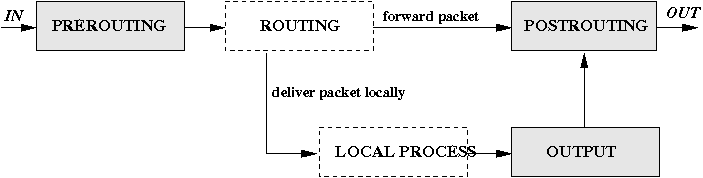
PREROUTING, OUPUT, POSTROUTING

enter image description here

외부에서 {IP:PORT} 로 오는 패킷을 {IP:PORT} 로

10.10.10.44:80 로 오는 모든 패킷을 16.16.16.16:8080 으로 보내기

$ iptables -A PREROUTING -t nat -p tcp -m tcp -i eth2 -d 10.10.10.44 --dport 80 -j DNAT --to 16.16.16.16:8080

로컬에서 {IP:PORT} 로 오는 패킷을 {IP:PORT} 로

10.10.10.44:80 로 오는 모든 패킷을 16.16.16.16:8080 으로 보내기

$ iptables -A OUTPUT -t nat -p tcp -m tcp -i eth2 -d 10.10.10.44 --dport 80 -j DNAT --to 16.16.16.16:8080

참고

NAT - Network Address Translation


GoogleDriveOnLinux

Linux 에서 GoogleDrive 사용하기

Client 설치

$ yum install grive

GoogleDrive용 디렉토리 생성

아무 디렉토리나 GoogleDrive 동기화를 위한 디렉토리 생성

$ mkdir /mnt/drive/google

GoogleDrive 인증키 생성

GoogleDrive용으로 생성한 디렉토리로 이동

$ cd /mnt/drive/google

GoogleDrive 인증을 위한 명령 실행

$ grive -a

인증 URL 접근후 인증키 획득후 붙여넣기후 Enter(올바르다면 GoogleDrive 에 있는 파일들이 동기화 된다.)
-----------------------
Please go to this URL and get an authentication code:

https://accounts.google.com/o/oauth2/auth?scope=https%3A%2F%2Fwww.googleapis.com%2Fauth%2Fuserinfo.email+https%3A%2F%2Fwww.googleapis.com%2Fauth%2Fuserinfo.profile+https%3A%2F%2Fdocs.google.com%2Ffeeds%2F+https%3A%2F%2Fdocs.googleusercontent.com%2F+https%3A%2F%2Fspreadsheets.google.com%2Ffeeds%2F&redirect_uri=urn:ietf:wg:oauth:2.0:oob&response_type=code&client_id=22314510474.apps.googleusercontent.com

-----------------------
Please input the authentication code here:
xxxxxxxxxxxxxxxxxxxxxxxxxxxxxxxxxxxxxxxxxxxxxxxxxxxxxxxxxxxxxxx
Reading local directories
Synchronizing folders
Reading remote server file list
Synchronizing files
.
.
.

GoogleDrive 동기화(Upload/Download)

$ cd /mnt/drive/google
$ grive

Reading local directories
Synchronizing folders
.
.

GoogleDrive 자동 동기화 설정

동기화 스크립트 작성

$ vi /usr/sbin/googleDriveSync

#!/bin/env bash

# Google Drive Sync

_gdrive_root=/mnt/drive/google
pushd $_gdrive_root &> /dev/null
grive
popd &> /dev/null
동기화 스크립트 cron 등록

$ crontab -e

0 * * * * /usr/sbin/googleDriveSync &> /var/log/googleDriveSync.log


DevNull

/dev/null 생성하기

실수로 /dev/null 를 지웠을 경우 재생성 방법(혹은 ln -sf ${target} /dev/null 과 같은 실수)

$ udevadm trigger --sysname-match=null

OR

$ mknod /dev/null c 1 3


Date

Date 명령어

오늘 날짜 구하기

$ date +'%Y-%m-%d %H:%M:%S'

2013-08-07 16:56:12

하루전 날짜 구하기

$ date --date="-1 day" +'%Y-%m-%d %H:%M:%S'

2013-08-06 16:56:12

하루후 날짜 구하기

$ date --date="+1 day" +'%Y-%m-%d %H:%M:%S'

2013-08-08 16:56:12

마지막 지나간 요일에 대한 날짜 구하기

$ date --date="last Friday" +'%Y-%m-%d %H:%M:%S'

2013-08-02 16:56:12

돌아오는 요일에 대한 날짜 구하기

$ date --date="next Friday" +'%Y-%m-%d %H:%M:%S'

2013-08-09 16:56:12

Unix epoch time 구하기(seconds since 1970-01-01 00:00:00 UTC)

$ date +'%s'

1375863160


Crontab

Crontab 사용하기

명령 실행

$ crontab -e

작성

* * * * * $HOME/bin/minute.job

필드별 설명

------    --------  ---------------------------------------------------
필  드    의  미    범  위
------    --------  ---------------------------------------------------
첫번째    분        0-59
두번째    시        0-23
세번째    일        0-31
네번째    월        1-12
다섯번째  요일      0-7 (0 또는 7=일요일, 1=월, 2=화,...)
여섯번째  명령어    실행할 명령을 한줄로 쓴다.
------    --------  ---------------------------------------------------